


Posh – Create & Find Events
4.8165.00 Reviews
App Specs
- Version
- 8.24.0
- Updated On
- License
- Free
- Downloads
- 100,000+
- Developer
- Posh
- Categories
- Events
- Platform
- Android, iOS
Screenshots




 Analysis by AppCompare
I find the most useful way to judge an event app is to ask whether it helps with the whole outing, not just the moment you discover something interesting. You need to find an event that suits your plans, work out whether friends are going, and get reliable details when the day arrives. Posh – Create & Find Events aims to bring discovery and organizing together, which makes it more appealing to me than a listings page that leaves all the coordination elsewhere.
A social-first way to browse
Posh is an events app from developer Posh, and its focus is social as much as practical: people can look for events, while organizers can create them and communicate with participants. That combination matters if you often discover plans through friends or local organizers rather than by searching for a particular venue. The wider community is a potential advantage, though it is most useful when people and events in your area are active on the platform.
The app is free, has a Teen content rating, and is currently at version 8.18.0. It has a 4.8 average from around 1,500 ratings, with more than 100,000 installs. Those figures suggest that it has found an audience, but they are not a promise that your local listings will be comprehensive. I’d treat the app as another way to find plans, not as the only calendar I rely on.
Where it fits in an event search
For someone who routinely checks group chats, social feeds, and separate ticket pages, an app that combines event discovery with attendee connections could reduce some of that back-and-forth. I would start by browsing for something specific—say, a music night or a local meet-up—then compare the event details with the organizer’s own information before making firm plans. That small check is especially worthwhile if the event is important or involves travel.
Compared with a general social network, an events-focused app gives plans a clearer home instead of burying them among unrelated posts. Compared with a basic calendar, it can help you discover something to add in the first place. The trade-off is that a specialized community depends on organizers choosing to post there; for niche events or smaller towns, a local mailing list, venue page, or friends’ recommendations may still surface options Posh does not.
Useful for hosts, with a planning caveat
Hosting is where the app’s two-sided approach could be particularly handy. The original review’s experience describes guided event setup, venue details, ticket sales, sharing, attendee visibility, and event-specific chats. In practice, I’d use those tools to keep the basic plan in one place: publish the essential information, share it with the people likely to care, and use the event space to handle questions or changes. That is more orderly than sending separate updates through several chats.
There is a trade-off, though. An app can make an event easier to promote without guaranteeing that the right people will see it or that attendance will match expectations. I would still write a clear description, make the location and timing easy to understand, and share the listing through the channels my intended guests already use. If you are organizing something important, keep your own copy of key details and do not assume every guest checks app messages promptly.
Worth Reading Before You Choose

EA SPORTS FC Mobile 26 Is a Bigger Football Game, but It Takes Time

Flipboard Shows What News Apps Must Do Beyond the Feed

Switching to Android Auto Means Rethinking Your Driving Routine

Google Calendar Makes a Crowded Week Easier to Manage

Ludo King Makes the Most of the Minutes Between Plans

Baby Panda World Brings Quick Play to Modern Phones, but Its Game Library Feels Busy
Discover Events Effortlessly
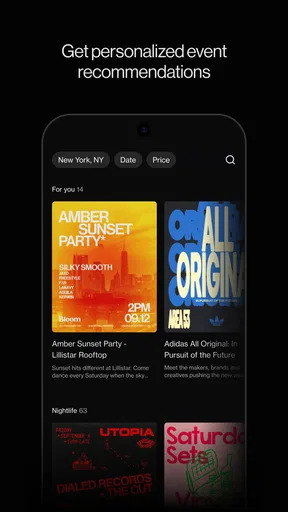
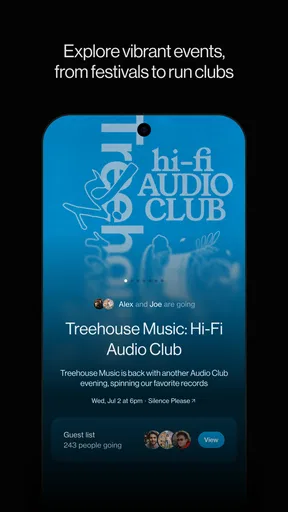
The first thing that struck me about Posh was its user-friendly interface. Seriously, navigating through the app feels like a breeze. Once you fire up the app, you’re greeted with a clean and intuitive design that makes searching for events as simple as pie. Whether you're into music festivals, art exhibits, or local meet-ups, Posh has got you covered.
What I love most is the app’s ability to personalize event recommendations based on your interests. It’s like having a personal event planner in your pocket. You can browse through categories or just let the app suggest events that align with your vibes. Trust me, it’s a time-saver!
Creating Your Own Events
Now, if you’re someone who loves hosting, Posh makes it super easy to create and manage your own events. The app guides you through setting up all the nitty-gritty details, from venue selection to ticket sales. It's pretty much like having an event planning assistant without the hefty price tag.
One standout feature is the event promotion tools. You can easily share your event across various social media platforms straight from the app. This integration ensures you reach a broader audience, which is perfect for boosting attendance.
Community and Connectivity
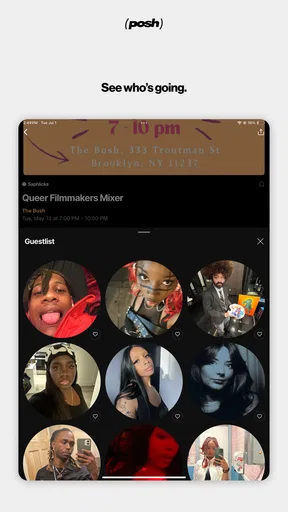
Another cool aspect of Posh is the sense of community it fosters. You can see who else is attending events, making it a great opportunity to network or make new friends. The app also allows you to join event-specific chat groups, so you can connect with fellow attendees before the big day.
Moreover, event organizers can engage with participants, answer queries, and provide updates, all within the app. This feature keeps everyone in the loop and enhances the overall event experience.
Everyday planning without the group-chat sprawl
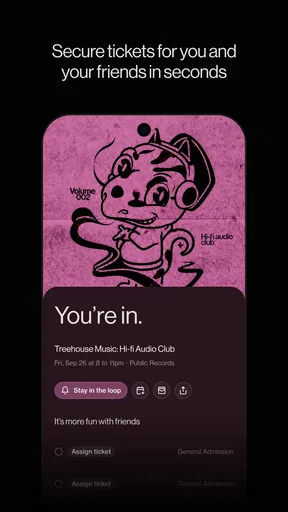
A realistic use for me would be deciding on a Friday afternoon that I want to do something on Saturday, but not yet knowing what. I could browse recommendations, send a promising event to a friend, and use the attendee and chat elements to get a feel for whether it might suit our group. Once we agree, I’d check the timing and venue details, then save the plan wherever I normally keep appointments. That last step is useful because discovery and personal scheduling are not quite the same job.
For a host arranging a small gathering or public event, I’d treat Posh as the shared information point rather than the entire operation. Put the essentials in the event listing, use its communication options for changes that affect attendees, and repeat any critical update through the channel your guests are most likely to notice. This avoids relying on one notification being seen by everyone, while still keeping the event conversation more focused than a long-running group chat.
Small habits that make the experience better
I’d be deliberate about how I use recommendations. If the app suggests events that fit my interests, I would still browse categories now and then rather than assuming the recommendation feed represents everything happening nearby. A feed is a useful shortcut, not a complete local guide; checking a venue or organizer directly can fill gaps, especially when I’m looking for a specific kind of event.
When I find a listing I might attend, I’d look at the practical details before getting attached to the idea: where it is, when it starts, and whether the organizer has provided enough context for me to decide. If friends are involved, sharing the event early gives them time to respond instead of turning a promising plan into a last-minute scramble. For hosts, a concise description and a clear update in the event space can prevent repeated questions about the basics.
There is also a useful social trade-off to keep in mind. Seeing who else is attending and talking before an event may make going alone feel less awkward, but some people prefer to keep their plans private or make arrangements outside an app. I see those community features as optional aids, not as a reason to share more than feels comfortable. The app is a better fit if you enjoy social discovery than if you want an entirely private, low-interaction event directory.
What the version history can and cannot tell you
The app was released on May 16, 2023, and version 8.18.0 is the current version. That gives me a concrete sense that Posh has continued through multiple iterations since its debut, but a version number alone does not tell me which individual features changed or how a particular update affects my routine. I would not assume that a newer version automatically means a specific improvement to recommendations, ticket handling, or local coverage.
For existing users, the practical approach is to judge the current app by the parts they actually use. If discovery, event setup, or attendee communication is central to your plans, check that those workflows still feel clear after updating and confirm important event details before sharing them widely. New users can begin with a low-stakes event search or a simple listing rather than moving every social plan into a new platform at once.
Posh’s average rating is encouraging, but reviews and ratings reflect different people, locations, and expectations. The app’s community is described as connecting more than five million eventgoers and organizers, which hints at a broad network; it does not mean every city or interest will have the same level of activity. I’d use the app alongside local venue pages or recommendations from friends until I knew how well its listings matched my own area.
Who should try it—and who may prefer another route
I’d recommend giving Posh a try if you like finding social plans, want event details and conversation closer together, or regularly organize gatherings and need a place to share updates. It is especially appealing when you are open to discovering something new rather than searching only for one known event. The free price makes a trial straightforward, while the Teen rating is a useful signal for families deciding whether the app is appropriate for a younger user.
I would look elsewhere if your main need is a comprehensive directory of every small local event, a private personal calendar, or a simple ticket-purchase flow with no interest in community features. A venue’s own page may be more dependable for its schedule, a calendar may be better for reminders, and a familiar messaging app may suit a group that already coordinates comfortably there. Posh’s value comes from combining these social and organizer-focused roles, so it makes less sense if you only want one of them.
Questions worth settling before relying on it
Will it show enough events near you? That depends on local participation, so I’d search your area and interests before making it your main discovery tool. Can you use it just to browse? Its event-discovery role makes that a sensible starting point, even if you never host. Is it suitable for organizing? It offers event creation and management tools, but I would still keep an independent record of critical logistics. Does it replace a calendar or ticket service? I would not treat it as a full substitute for either; use the tool that best handles reminders, official event details, or the transaction you need.
Those distinctions are more useful than expecting one app to manage every part of going out. Posh can help connect the discovery, social, and hosting sides of an event, while your regular calendar, venue information, or direct communication may remain important. That balance lets you benefit from the app without depending on it for tasks it is not meant to replace.
The Final Verdict
So, should you download Posh – Create & Find Events? If you’re looking to enhance your social life or need a reliable tool to organize your own events, I’d say give it a go. Its seamless interface, personalized recommendations, and robust event management features make it stand out in the crowded sea of event apps.
Of course, like any app, it’s not without its quirks. Occasionally, you might find some lesser-known local events missing from the listings. However, with regular updates, the app continues to expand its database, so this is likely to improve over time.
In a nutshell, Posh is like having a social concierge at your fingertips. If you’re ready to spice up your calendar and dive into the world of exciting events, this app is definitely worth a try. Happy exploring!
Pros
- User-friendly interface for seamless navigation.
- Extensive event categories to suit all interests.
- Real-time updates on event changes or cancellations.
- Option to create personalized event lists.
- Social sharing features to invite friends easily.
Cons
- Requires stable internet for optimal performance.
- Limited offline functionalities.
- Occasional bugs in event notifications.
- Some features locked behind a paywall.
- Location services drain battery quickly.
FAQs for Posh – Create & Find Events
What is Posh – Create & Find Events?
Posh is an innovative platform that allows users to both create and discover local events. Whether you're organizing a small gathering or a large public event, Posh provides tools to manage invitations, RSVPs, and even ticket sales. Users can explore events based on their interests and location.
How do I create an event on Posh?
To create an event, simply sign up or log in to the Posh app. Navigate to the 'Create Event' section, where you can enter details such as the name, date, time, location, and description of your event. You can also customize settings for invitations, ticketing, and privacy.
Can I find events tailored to my interests on Posh?
Yes, Posh offers a personalized event discovery experience. The app allows you to filter events by categories such as music, sports, arts, and more. Additionally, it uses your location and preferences to suggest events that might interest you, ensuring you never miss out on exciting happenings.
Is Posh free to use?
Posh offers a free version with essential features for both event creators and attendees. However, there are premium options available that provide advanced functionalities like enhanced analytics for event organizers and exclusive event access for attendees. Check the app for detailed pricing and subscription options.
How secure is my data on Posh?
Posh prioritizes user privacy and data security. The app employs encryption and stringent security measures to protect personal information. Additionally, users can control their privacy settings to determine who can see their events and personal details. Always review the app's privacy policy for more information.


